

After logging in, the user is taken to the home page, also referred to below as the “Dashboard”. Here you will find portlets for
(1) Quick start,
(2) AI mailbox,
(3) Favorites and
(4) News & notifications.
The Quick Start portlet contains links to websites that the user can access quickly. By clicking on the other portlets, the user can access the corresponding applications. The scope of the applications mentioned above is described in more detail in the following chapters.
(5) Menu bar
(6) Global search
(7) User icon
(8) Notification bell
(9) Fold-out footer (footer)
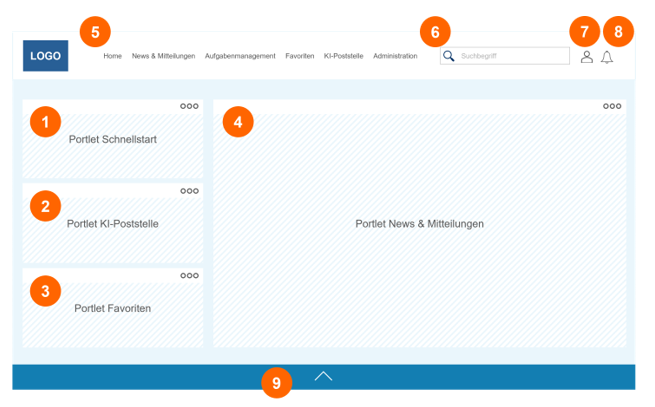
In addition to the Home tab, the top line also contains the News & Messages, Task Management, Favorites, Administration and other applications (e.g. AI mailroom) tabs (5). There is a search bar on the top right-hand side, which can be used to search the entire portal for terms and file names (6).
Next to the search bar (6) is the user icon (7) and the notification bell (8), which shows the number of new, unread notifications.
By clicking on the bell, the new notifications are displayed chronologically and there is a “Mark all as read” function. If the user clicks on a specific notification, they are redirected to the corresponding modules (applications) or an editing window opens.
The collapsible and expandable footer (9) contains further information that can be configured individually. Examples of this are: legal information, imprint, emergency numbers and social media. The content of this footer can be configured under Administration in the “Footer management” app.