

The following overview shows which actions can be carried out by the user and which by the administrator.
Possible favorite types at a glance:
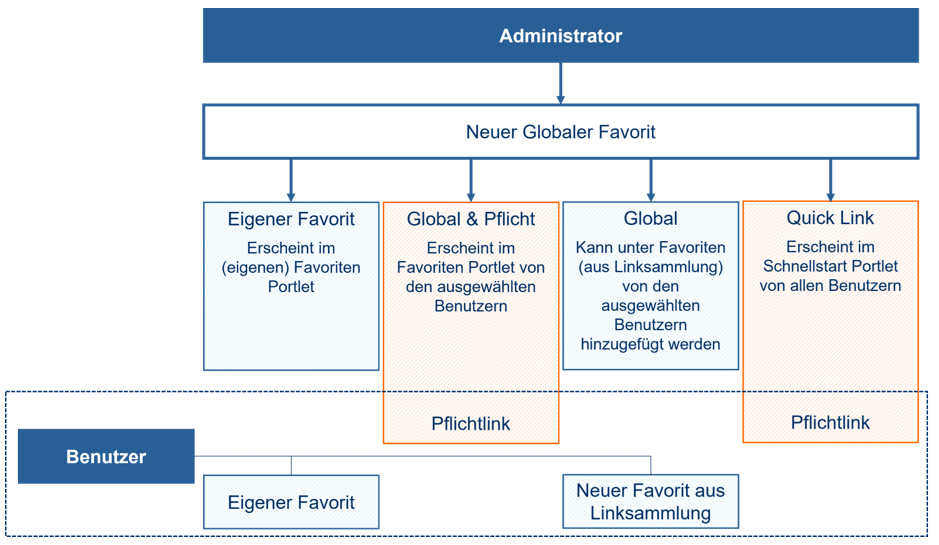
In the Favorites tab, the user can choose between the options “New favorite” and “New favorite from link collection”. When creating a new favorite, the user must enter a name and a URL. Optionally, a category, a short description and a favorite symbol can be added. After clicking on “Save”, the newly created favorite appears in the overview table under the Favorites tab.
The user can add a global favorite to their dashboard using the “Favorite from link collection” button. If a global favorite should no longer appear in the dashboard, it can be hidden using the eye icon in the favorites overview.
The user can also create their own favorites from the News & Messages, Task Management or AI Mailroom modules. This is done by clicking on the pin icon next to the module heading.
The Favorites overview table displays the columns Title, Description, URL, Category and Favorite type. These columns can be sorted alphabetically in ascending or descending order using the arrow symbol. Each favorite is displayed in a separate line and offers the following functions depending on the authorization:
The application also offers advanced filter options: