

In the “E-correspondence” tab, the user sees an overview of all mail processes that concern them. The overview shows that seven mail processes have been assigned directly to the user, for which they are solely responsible. The number next to “New mail” (e.g. 235) and “In process” (e.g. 36) refers to mail processes from process types for which the user is jointly responsible with other processors.
E-correspondence” view with search and filter options:
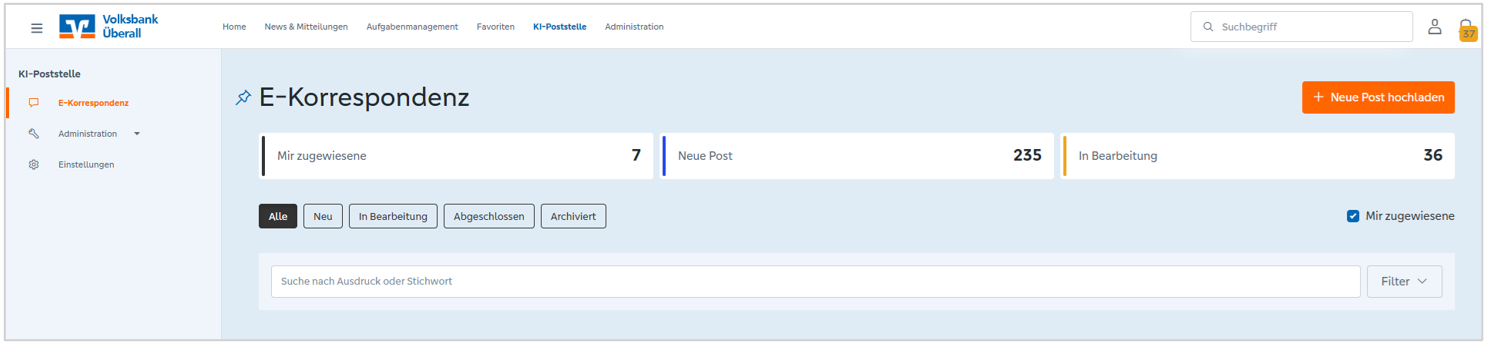
The overview table initially only shows the user the mail processes directly assigned to them. If the user removes the tick from the “Assigned to me” checkbox, mail processes are also displayed that belong to the process types for which the user is stored as an editor.
If the user only wants to see “New mail” or “In process” mail from their relevant process types, they can click on the corresponding overview.
The overview table can be filtered according to the following criteria using the fold-out filter options:
In addition, the status of the mail processes can be filtered using the “All”, “New”, “In process”, “Completed” and “Archived” buttons.